EVPN/VXLAN Fabric with Cisco Nexus 9000v
| Component | Details |
|---|---|
| Vendor | Cisco NX-OS |
| Nodes | 2 spines, 3 leaves, 2 hosts |
| Image | vrnetlab/cisco_n9kv:9300-10.4.6 |
| Containerlab | Containerlab Documentation |
| Topology | topology.clab.yml |
| Manifests | kubernetes/ |
Description
A spine-leaf EVPN/VXLAN fabric demonstrating Layer 2 extension across a routed IP fabric. Features vPC multi-homing for high availability, OSPF underlay routing, and BGP EVPN overlay control plane.
Use cases:
- Data center fabric automation with declarative Kubernetes resources
- Multi-homed server connectivity with active-active forwarding
- VXLAN overlay network with multicast-based BUM traffic handling
Lab Environment
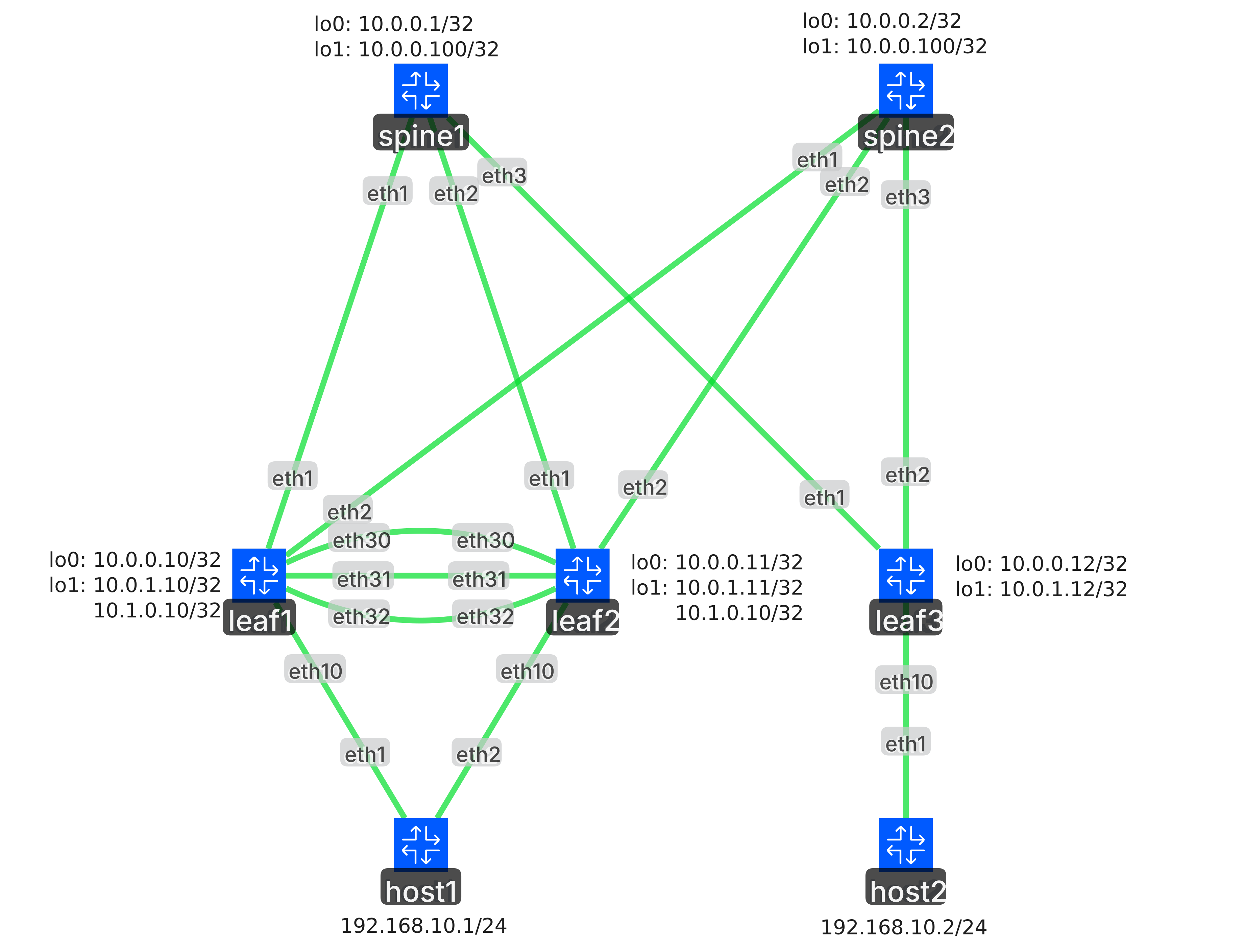
The lab consists of 7 nodes deployed via Containerlab:
- 2 Spine switches (spine1, spine2): Route reflectors for BGP EVPN
- 3 Leaf switches (leaf1, leaf2, leaf3): VXLAN tunnel endpoints (VTEPs)
- 2 Host servers (host1, host2): Linux endpoints with VLAN 10 connectivity
Network design:
- Underlay: OSPF Area 0.0.0.0, /31 point-to-point links
- Overlay: iBGP EVPN (ASN 65000), route reflector on spines
- VXLAN: VNI 100010 mapped to VLAN 10 for Layer 2 bridging
- Multi-homing: vPC domain between leaf1 and leaf2 for host1
Deploying the Lab
Deploy the Containerlab topology:
cd examples/cisco-n9k-evpn-vxlan
containerlab deploy -t topology.clab.yml
Apply all Kubernetes resources:
kubectl apply -k ./kubernetesDemo Walkthrough:
Configuration Resources
The fabric configuration uses multiple Kubernetes Custom Resources, applied in sequence to build the complete EVPN/VXLAN topology.
1. Device Registration
Register network devices with the Network Operator. Each Device resource specifies the gNMI endpoint and credentials.
NOTE
Each network device in the topology requires a Device resource. The example below shows leaf1; the tutorial deploys 5 devices total (3 leaves, 2 spines).
apiVersion: networking.metal.ironcore.dev/v1alpha1
kind: Device
metadata:
  name: leaf1
spec:
  endpoint:
    address: 192.168.5.2:50011
    secretRef:
name: fabric-credentialskubectl apply -k ./kubernetes/01-devices2. Loopback Interfaces
Configure loopback interfaces for router IDs (lo0) and service addresses (lo1):
- lo0: Router ID for OSPF and BGP on all switches
- lo1: VTEP source address on leaf switches, rendezvous point address on spine switches
NOTE
Each switch requires two loopback interfaces (lo0 and lo1). The example below shows leaf1's lo0; the tutorial creates 10 Interface resources across all 5 switches.
apiVersion: networking.metal.ironcore.dev/v1alpha1
kind: Interface
metadata:
  name: leaf1-lo0
spec:
  deviceRef:
    name: leaf1
  name: lo0
  description: Router-ID Leaf1
  adminState: Up
  type: Loopback
  ipv4:
    addresses:
- 10.0.0.10/32kubectl apply -k ./kubernetes/02-loopbacks3. vPC Keepalive
Create dedicated VRF and Layer 3 link for vPC peer health monitoring between leaf1 and leaf2.
NOTE
Each vPC peer requires a dedicated VRF and physical Interface for keepalive. The example below shows leaf1's configuration; the tutorial creates 2 VRF and 2 Interface resources total for the vPC pair (leaf1 and leaf2).
apiVersion: networking.metal.ironcore.dev/v1alpha1
kind: VRF
metadata:
  name: leaf1-vpc-keepalive
spec:
  deviceRef:
    name: leaf1
  name: VPC_KEEPALIVE
  description: VRF for vPC Keepalive
---
apiVersion: networking.metal.ironcore.dev/v1alpha1
kind: Interface
metadata:
  name: leaf1-eth1-30
spec:
  deviceRef:
    name: leaf1
  name: eth1/30
  description: vPC Keepalive
  adminState: Up
  type: Physical
  vrfRef:
    name: leaf1-vpc-keepalive
  ipv4:
    addresses:
- 10.1.1.1/30kubectl apply -k ./kubernetes/03-vpc-keepalive4. vPC Peer Link
Configure port-channel between vPC peers using interfaces eth1/31-32 with LACP.
NOTE
Each vPC peer requires physical member interfaces (eth1/31, eth1/32) and a port-channel aggregate. The example below shows leaf1's configuration; the tutorial creates 6 Interface resources total: 4 physical members and 2 port-channels for the vPC pair (leaf1 and leaf2).
apiVersion: networking.metal.ironcore.dev/v1alpha1
kind: Interface
metadata:
  name: leaf1-eth1-31
spec:
  deviceRef:
    name: leaf1
  name: eth1/31
  description: vPC Peer-Link
  adminState: Up
  type: Physical
  switchport:
    mode: Trunk
    nativeVlan: 1
---
apiVersion: networking.metal.ironcore.dev/v1alpha1
kind: Interface
metadata:
  name: leaf1-eth1-32
spec:
  deviceRef:
    name: leaf1
  name: eth1/32
  description: vPC Peer-Link
  adminState: Up
  type: Physical
  switchport:
    mode: Trunk
    nativeVlan: 1
---
apiVersion: networking.metal.ironcore.dev/v1alpha1
kind: Interface
metadata:
  name: leaf1-po1
spec:
  deviceRef:
    name: leaf1
  name: po1
  description: vPC Peer-Link
  adminState: Up
  type: Aggregate
  switchport:
    mode: Trunk
    nativeVlan: 1
  aggregation:
    controlProtocol:
      mode: Active
    memberInterfaceRefs:
      - name: leaf1-eth1-31
- name: leaf1-eth1-32kubectl apply -k ./kubernetes/04-vpc-peerlink5. vPC Domain
Establish the vPC domain, enabling virtual port-channel switching for active-active multi-homing.
NOTE
Each vPC peer requires a VPCDomain resource to enable virtual port-channel switching. The example below shows leaf1; the tutorial creates 2 resources for the vPC pair (leaf1 and leaf2).
apiVersion: nx.cisco.networking.metal.ironcore.dev/v1alpha1
kind: VPCDomain
metadata:
  name: leaf1-vpcdomain
spec:
  deviceRef:
    name: leaf1
  domainId: 1
  adminState: Up
  peer:
    adminState: Up
    interfaceRef:
      name: leaf1-po1
    switch:
      enabled: true
    gateway:
      enabled: true
    keepalive:
      source: 10.1.1.1
      destination: 10.1.1.2
      vrfRef:
name: leaf1-vpc-keepalivekubectl apply -k ./kubernetes/05-vpc-domain6. Fabric Interconnects
Configure routed point-to-point links between spine and leaf switches with IP unnumbered interfaces.
NOTE
Each spine-leaf link requires an Interface resource on both ends. The example below shows leaf1's uplink to spine1; with 3 leaves and 2 spines in a full mesh, the tutorial creates 12 interfaces total (2 uplinks per leaf, 3 downlinks per spine).
apiVersion: networking.metal.ironcore.dev/v1alpha1
kind: Interface
metadata:
  name: leaf1-eth1-1
spec:
  deviceRef:
    name: leaf1
  name: eth1/1
  description: Leaf1 to Spine1
  adminState: Up
  type: Physical
  mtu: 9216
  ipv4:
    unnumbered:
      interfaceRef:
name: leaf1-lo0kubectl apply -k ./kubernetes/06-interconnects7. OSPF Underlay
Deploy OSPF for IP reachability across the fabric. All interfaces participate in Area 0.0.0.0.
NOTE
Each switch requires an OSPF resource to participate in the underlay routing. The example below shows leaf1; the tutorial creates 5 resources across all switches (3 leaves, 2 spines).
apiVersion: networking.metal.ironcore.dev/v1alpha1
kind: OSPF
metadata:
  name: leaf1-underlay
spec:
  deviceRef:
    name: leaf1
  instance: UNDERLAY
  routerId: 10.0.0.10
  logAdjacencyChanges: true
  interfaceRefs:
    - name: leaf1-lo0
      area: 0.0.0.0
      passive: true
    - name: leaf1-lo1
      area: 0.0.0.0
      passive: true
    - name: leaf1-eth1-1
      area: 0.0.0.0
    - name: leaf1-eth1-2
area: 0.0.0.0kubectl apply -k ./kubernetes/07-underlay8. PIM Sparse Mode
Enable PIM on fabric interfaces for multicast-based BUM traffic. Spines act as rendezvous points.
NOTE
Each switch requires a PIM resource for multicast routing. The example below shows leaf1; the tutorial creates 5 resources across all switches (3 leaves, 2 spines). The spine switches are additionally configured to serve as rendezvous points with their loopback lo1 address used as redundant anycast address.
apiVersion: networking.metal.ironcore.dev/v1alpha1
kind: PIM
metadata:
  name: leaf1-pim
spec:
  deviceRef:
    name: leaf1
  rendezvousPoints:
    - address: 10.0.0.100
      multicastGroups:
        - 224.0.0.0/4
  interfaceRefs:
    - name: leaf1-lo0
      mode: Sparse
    - name: leaf1-lo1
      mode: Sparse
    - name: leaf1-eth1-1
      mode: Sparse
    - name: leaf1-eth1-2
mode: Sparsekubectl apply -k ./kubernetes/08-pim9. BGP Router
Configure BGP routing process with ASN 65000 and enable L2VPN EVPN address family.
NOTE
Each switch requires a BGP resource to configure its routing process. The example below shows leaf1; the tutorial creates 5 resources across all switches (3 leaves, 2 spines).
apiVersion: networking.metal.ironcore.dev/v1alpha1
kind: BGP
metadata:
  name: leaf1-bgp
spec:
  deviceRef:
    name: leaf1
  asNumber: 65000
  routerId: 10.0.0.10
  addressFamilies:
    ipv4Unicast:
enabled: truekubectl apply -k ./kubernetes/09-bgp-router10. BGP EVPN Peers
Establish BGP EVPN peering with spine route reflectors using loopback addresses.
NOTE
Each BGP session requires a BGPPeer resource. The example below shows leaf1's peering with spine1; the tutorial creates 12 resources total: 3 leaves each peer with both spines (6 sessions), plus the 2 spines peer with each leaf (6 sessions).
apiVersion: networking.metal.ironcore.dev/v1alpha1
kind: BGPPeer
metadata:
  name: leaf1-spine1
spec:
  deviceRef:
    name: leaf1
  bgpRef:
    name: leaf1-bgp
  address: 10.0.0.1
  asNumber: 65000
  localAddress:
    interfaceRef:
      name: leaf1-lo0
  addressFamilies:
    l2vpnEvpn:
      enabled: true
sendCommunity: Bothkubectl apply -k ./kubernetes/10-bgp-peers11. NVE Interface
Create the VXLAN tunnel endpoint (NVE) on leaf switches with BGP host reachability for Layer 2 bridging.
NOTE
Each leaf switch requires a NetworkVirtualizationEdge resource to act as a VXLAN tunnel endpoint. The example below shows leaf1; the tutorial creates 3 resources for all leaf switches.
apiVersion: networking.metal.ironcore.dev/v1alpha1
kind: NetworkVirtualizationEdge
metadata:
  name: leaf1-nve1
spec:
  deviceRef:
    name: leaf1
  adminState: Up
  hostReachability: BGP
  sourceInterfaceRef:
    name: leaf1-lo1
  multicastGroups:
l2: 224.0.0.0/24kubectl apply -k ./kubernetes/11-nve12. VLANs
Create VLAN 10 on all leaf switches for host connectivity.
NOTE
Each leaf switch requires a VLAN resource for host connectivity. The example below shows VLAN 10 on leaf1; the tutorial creates this VLAN on all 3 leaf switches.
apiVersion: networking.metal.ironcore.dev/v1alpha1
kind: VLAN
metadata:
  name: leaf1-vlan-10
spec:
  deviceRef:
    name: leaf1
id: 10kubectl apply -k ./kubernetes/12-vlan13. Host Interfaces
Configure access ports to hosts. Leaf1 and leaf2 use vPC port-channel to host1; leaf3 connects directly to host2.
Host network configuration:
- host1: Multi-homed with LACP bonding. Physical interfaces eth1 and eth2 are aggregated into bond0 (802.3ad mode), with VLAN subinterface bond0.10 tagged for VLAN 10 and assigned IP address 192.168.10.1/24.
- host2: Single-homed connection. Physical interface eth1 carries VLAN subinterface eth1.10 tagged for VLAN 10 and assigned IP address 192.168.10.2/24.
NOTE
Each host connection requires physical Interface resources. Multi-homed connections also require port-channel interfaces. The example below shows leaf1's vPC port-channel to host1; the tutorial creates 5 resources total: physical interfaces on each leaf plus vPC port-channels on leaf1 and leaf2.
apiVersion: networking.metal.ironcore.dev/v1alpha1
kind: Interface
metadata:
  name: leaf1-eth1-10
spec:
  deviceRef:
    name: leaf1
  name: eth1/10
  description: Leaf1 to Host1
  adminState: Up
  type: Physical
  switchport:
    mode: Trunk
    nativeVlan: 1
    allowedVlans: [10]
---
apiVersion: networking.metal.ironcore.dev/v1alpha1
kind: Interface
metadata:
  name: leaf1-po-10
spec:
  deviceRef:
    name: leaf1
  name: po10
  description: vPC Leaf1 to Host1
  adminState: Up
  type: Aggregate
  switchport:
    mode: Trunk
    nativeVlan: 1
    allowedVlans: [10]
  aggregation:
    controlProtocol:
      mode: Active
    memberInterfaceRefs:
      - name: leaf1-eth1-10
    multichassis:
id: 10kubectl apply -k ./kubernetes/13-host14. EVPN Instance
Map VLAN 10 to VNI 100010, enabling Layer 2 extension across the VXLAN fabric.
NOTE
Each leaf switch requires an EVPNInstance resource to map VLANs to VNIs. The example below shows leaf1 mapping VLAN 10 to VNI 100010; the tutorial creates this mapping on all 3 leaf switches.
apiVersion: networking.metal.ironcore.dev/v1alpha1
kind: EVPNInstance
metadata:
  name: leaf1-vxlan-100010
spec:
  deviceRef:
    name: leaf1
  vni: 100010
  type: Bridged
  multicastGroupAddress: 239.1.1.100
  vlanRef:
name: leaf1-vlan-10kubectl apply -k ./kubernetes/14-vxlanVerification
Test Layer 2 connectivity across the VXLAN fabric:
# From host1 (192.168.10.1), ping host2 (192.168.10.2)
ssh host1
ping 192.168.10.2
Check EVPN routes and VXLAN tunnels:
ssh leaf1
show nve peers
show bgp l2vpn evpn vni-id 100010
show l2route evpn mac all
Verify vPC status:
ssh leaf1
show vpc brief
Cleanup
WARNING
The --cascade=foreground flag is required for proper cleanup. This ensures that child resources (interfaces, VLANs, BGP configurations, etc.) are deleted first before the parent Device resources are removed. Without this flag, the cleanup may fail or leave orphaned configurations on the switches.
kubectl delete -k ./kubernetes/ --cascade=foreground
containerlab destroy -t topology.clab.yml